Google Pay is a platform developed by Google that allows you to make payments through a single app. You can use Google Pay to digitally store your credit cards and make credit card payments through your mobile phone via contactless payments, transfer money to friends via PayNow and also make payments to establishments via PayNow. If you are familiar with other payment apps like Samsung Pay or Apple Pay, Google Pay fulfills the same functions but has more capabilities as it can also link to your bank account through PayNow.
Get S$8 free by signing up for Google Pay here (offer ends 31st Dec 23:59PM)
After downloading the app, all you need to do is to link it to your PayNow / Paylah / Standard Chartered account and add your credit cards to the digital wallet to get going.
Currently, Google Pay is running a series of offers where new users who sign-up will get S$8 cash – sent straight to your bank account after you make your first payment of at least S$10. Each week, users also get to earn additional cashback – a random amount sent via digital scratch cards, with the maximum at S$10 per scratch card. I have been using Google Pay for a couple of weeks now and have earned just a little under S$100 in cash back. Cash back is earned through the following ways:

just some of the google pay scratch cards i have earned over the past few days
Tap and Pay
As mentioned previously, Google Pay also acts as a digital wallet for your credit cards and you can use it to make contactless payments (i.e. paywave). The current promotion allows you to earn 4 scratch cards (max cash back per scratch card of S$10) for your first 4 tap and pay card payments of at least S$3 each through Google Pay.
To earn the maximum 4 tap and pay scratch cards, do note that you will have to make payment at different establishments. Splitting of bills won’t earn you multiple scratch cards. Also, do note that while you can add Citibank and AMEX cards into your Google Pay digital wallet, payments with these cards won’t earn any scratch cards.
Scan and Pay
More and more establishments these days – even hawker stalls – allow digital payments and most have QR codes displayed at the storefront. If you use your Google Pay app to scan and pay these QR codes for transactions that are at least S$3 each, you can also earn scratch cards (maximum S$10 cashback each). To get the scratch card, your recipient is not required to be a Google Pay user. The Scan and Pay category includes PayNow / Paylah payments that are made to establishments but not Paynow / Paylah payments that are made to individuals (for instance, those PayNow accounts that are identified via mobile number). The latter kind of payments also qualify for scratch cards but they fall under the next category rather than scan and pay.

offers which are updated weekly – what you need to do to earn google pay scratch cards
Send Money to Friends
As mentioned previously, PayNow / Paylah transfers done via Google Pay to individuals rather than establishments fall under the “send money to friends” category and each week, Google Pay users can earn up to 3 scratch cards. To earn a scratch card, the person you are sending to must also be a Google Pay user and has his/her Paylah/PayNow linked to it. Transfers need to be at least S$10 each and the scratch card is issued to both the sender and receiver up to the 3rd unique transfer made. For instance, if Tom transfers to Daisy, both Tom and Daisy will get a scratch card. No additional scratch card will be issued when Daisy subsequently transfers to Tom.
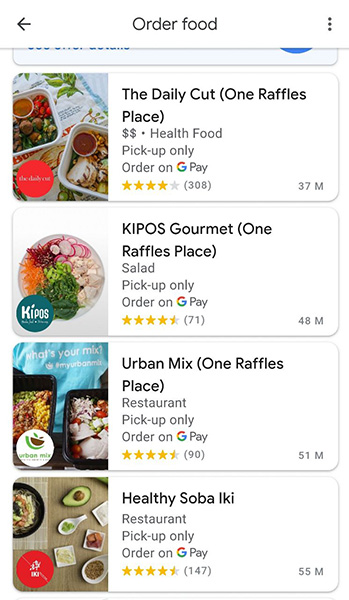
order food on google pay and get S$5 off – you can also pick-up the food yourself
Order Food
You can also order food via Google Pay and the good news is, you earn a guaranteed cashback of S$5 on food orders of at least S$10. This applies to both deliveries and pick-ups and the good news is that the app has quite a wide array of dining establishments which are reasonably priced. For instance, if you work in the CBD, you’ll find some of the ubiquitous establishments such as Omnivore, Paul, The Daily Cut, Asian Kitchen, etc to be on the app. A typical rice bowl at The Daily Cut is priced at about S$10 give or take. By using the “order food” function, you get approximately half off with the S$5 guaranteed cashback – for up to 1 order per week. A lot of neighborhood eateries and hawker stalls are on the app as well.
Verdict
I have been using Google Pay for a few weeks now and have been earning quite a bit of cashback with minimal hassle. The cashback is an obvious cost to Google and I am guessing the tech giant is trying to get as many new users as possible during the app’s beta stage. As of this writing, contactless payments are becoming increasingly common and even hawker stalls have it so we might as well earn some cashback in the process.
You May Also Like
 The Best Miles Earning Credit Cards for the Typical Salaried Singapore Worker – A Traveler’s Perspective
 Christmas Takeaways 2020 Singapore Nearly Complete Guide: Best Log Cake, Festive Ham & Turkey for the Yuletide Season
 SingapoRediscovers Staycation Deals Under Phase 3 – Where to Get Extra Perks on Top of Current Promotions
 Hotel Staycation Review: JW Marriott Hotel Singapore South Beach – Trendy Club Rooms & Compelling Dining Concepts
 Hotel Review: Andaz Singapore – Stylish Hyatt Hotel in Bugis & Perfect for Staycations
 Hotel Review: YOTEL Singapore – Orchard Road’s Most Affordable Hotel

Leave a Reply